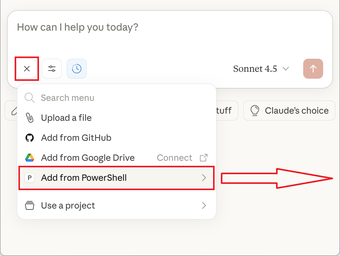
PowerShell.MCP: Local MCP Server for AI Shell Automation and Control
PowerShell.MCP by Yoshifumi Tsuda turns a standard PowerShell environment into a Model Context Protocol server, enabling AI assistants to operate on local systems. It bridges language models and the operating system so agents can run commands, scripts, and CLI tools directly from natural-language prompts. Key capabilities include live shared sessions, preserved environment state across commands, and broad access to installed PowerShell modules. Intended for system administrators, DevOps engineers, and power users who want AI-assisted local automation and troubleshooting.
What tasks can you actually use it for?
The tool converts a desktop or server shell into an endpoint that MCP clients can control, so AI clients can invoke cmdlets, execute scripts, and call installed command-line utilities. That permits administrative tasks such as configuration changes, log inspection, bulk file operations, and scripted automation to be issued through natural-language prompts while the operator observes outputs in the same session.
How consistent and inspectable are the tool's outputs?
Command responses are captured with detailed diagnostics: the server records all six PowerShell output streams (Success, Error, Warning, Information, Verbose, Debug) and returns them to the client. The implementation uses zero-overhead execution, producing near-instant results without spawning new processes, and includes specialized cmdlets optimized for text-file handling and system analysis to help parse and interpret outputs programmatically.
What does it require to run and integrate?
Deployment is cross-platform but gated by platform prerequisites: the tool requires PowerShellor later (7.4+ recommended) and PSReadLineor higher. Installation is handled through the PowerShell Gallery via Install-Module PowerShell.MCP, and the server connects to any MCP-compatible client such as Claude Desktop or other MCP-aware environments to enable AI-driven workflows.
Is it suitable for local and enterprise workflows?
The server uses local-only communication via named pipes to avoid network exposure and preserve local control, a design point aimed at enterprise security policies. It is published as open-source and maintained by the developer, and it has been acknowledged by the official PowerShell team within the ecosystem. Those facts make it practical for teams that require inspectable code and constrained data flow inside a controlled environment.
Clear choice for hands-on administrators who will audit AI outputs
The tool suits administrators and DevOps professionals who need AI-driven command execution while retaining operator control and auditability. Expect a productive fit when you can review commands before they run; do not treat generated instructions as authoritative without verification. For teams comfortable with PowerShell practices and code inspection, the tool provides a pragmatic bridge between language models and local system work.